Product, Tutorial
Less Waiting, More Winning How Smart Marketing Agencies Use AI to Drive Results Faster
Replace slow BI dashboards with conversational analytics. Ask questions in plain English and get CTR, CPC, and ROAS metrics visualized in seconds.
Pin Chang
Updated: Dec 18, 2025
Published: Jul 03, 2025
For marketing and advertising agencies, timing is everything. Being able to instantly understand how a campaign is performing, and adjust in real time, can be the difference between wasted spend and high ROI. Teams need fast, reliable insights to evaluate ad effectiveness, optimize creative, and shift strategy on the fly.
Traditional BI tools often slow this process down. Teams have to extract data, select the right columns, build dashboards, and wait for visualizations to load. By the time insights are surfaced, the moment to act may have passed, and the budget might already be spent on the wrong audience, channel, or creative.
That’s where Wren AI comes in. With natural language querying, real-time charting, and smart metric modeling, Wren AI helps teams skip the BI bottleneck. You can simply ask a question in plain language and get a visualized, accurate answer in seconds.
From Raw Data to Instant Insights
For advertising and marketing teams, performance metrics are everything. Whether it’s CPC, CTR, ROAS, or campaign-specific KPIs, decision-makers need fast answers to optimize spend and creative direction.
Getting started is easy. Upload a CSV file or connect your own database, complete a lightweight modeling step (like setting up semantic labels and table relationships), and you’re ready to query!
With Wren AI, if your organization uses custom metrics, you can define them using the Knowledge feature. Just provide a simple instruction or formula, and Wren AI will learn how to calculate and return the metric exactly as you want, ensuring consistency across every question you ask. These definitions live in Wren AI’s semantic layer, so ROAS or CPC means the same thing in every teammate’s answer and in every AI agent’s report, with access governed centrally.
To show how Wren AI supports performance marketing teams, here are examples of how you can define and explore two essential ad metrics: CTR and CPC.
(sample data from Kaggle : https://www.kaggle.com/datasets/rahulchavan99/marketing-campaign-dataset/data)
- CTR:

Defining the CTR formula as a Knowledge instruction
Sample questions you can ask:
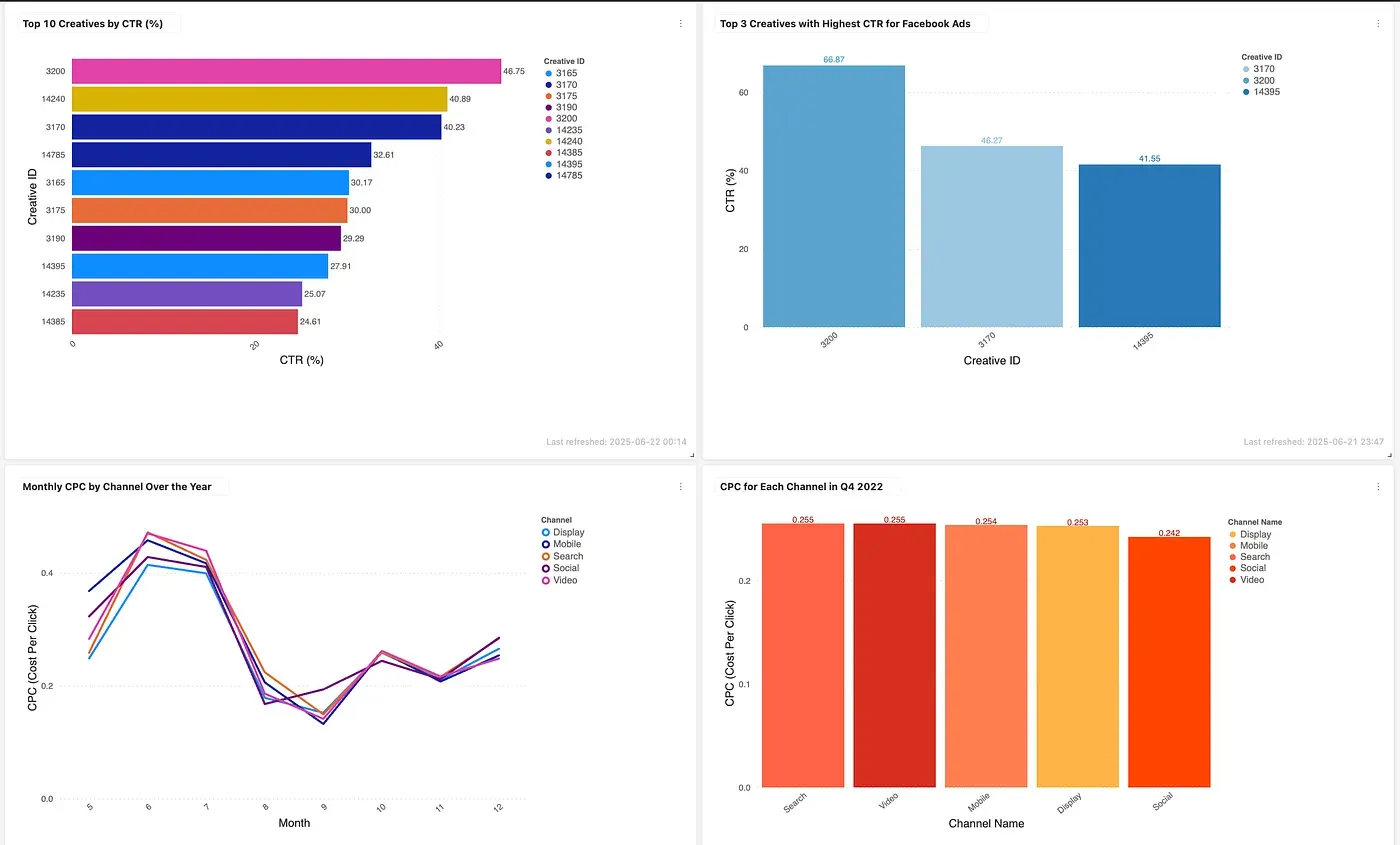
“What’s the CTR for each channel?”
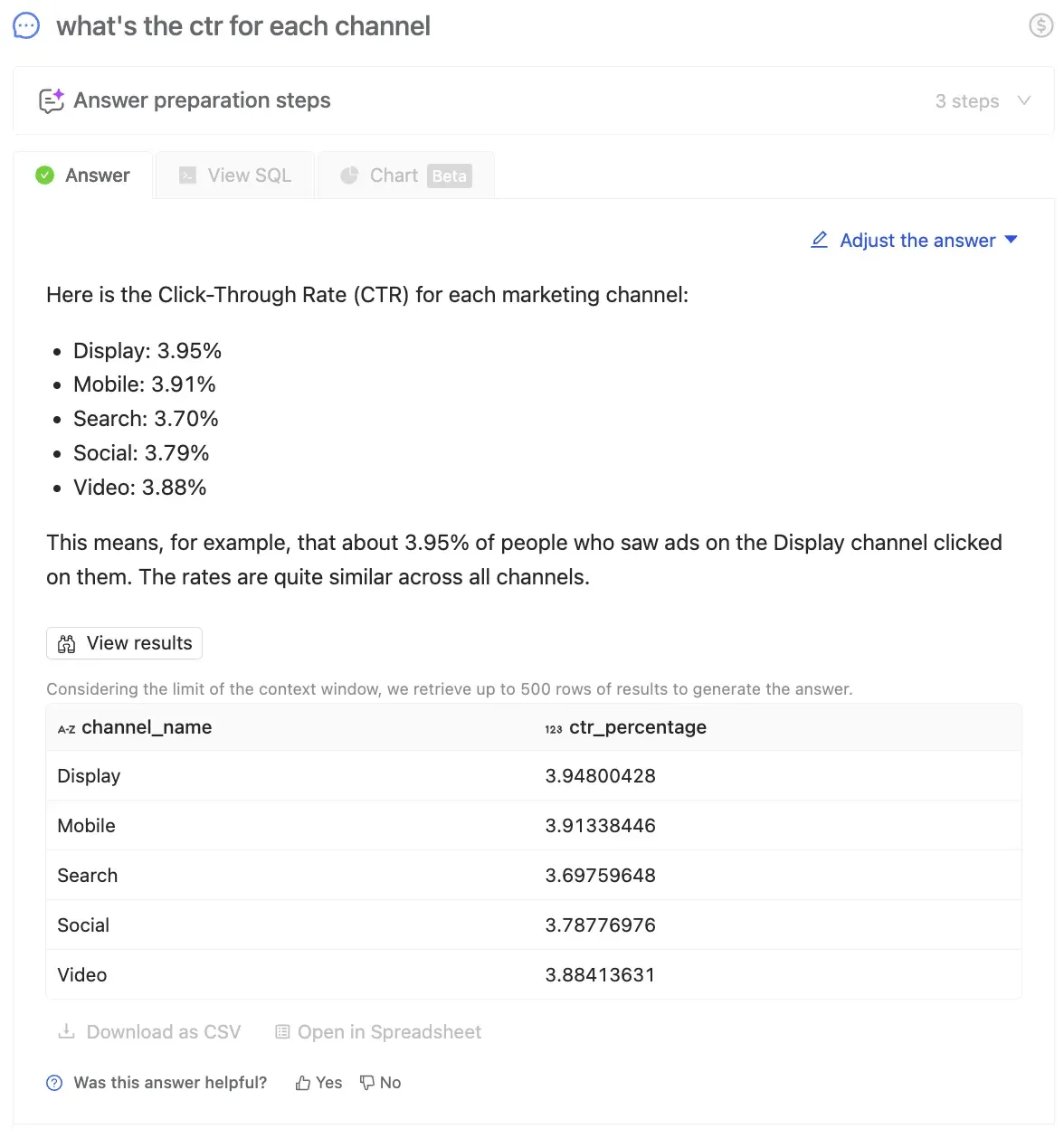
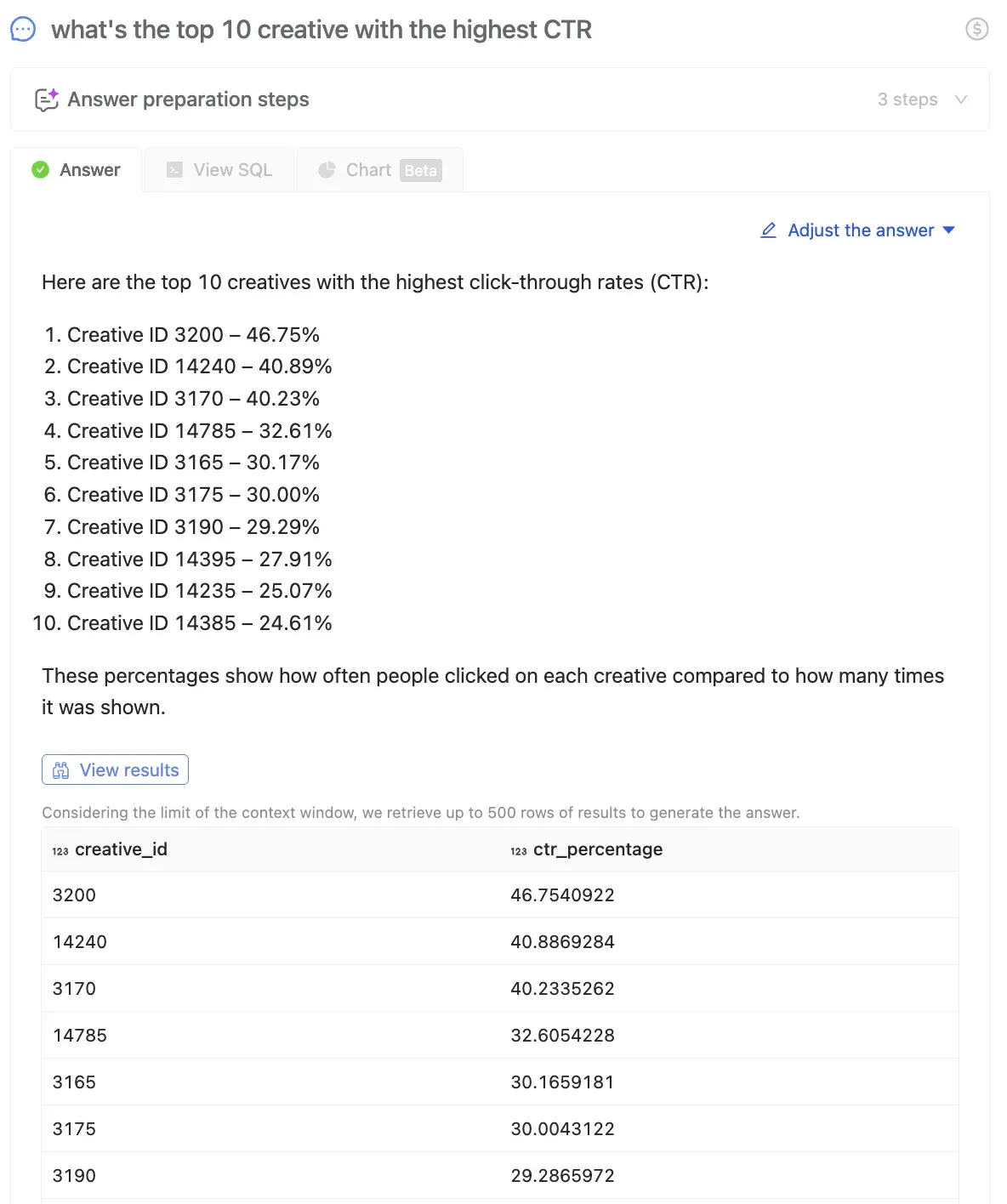
“What’s the top 10 creative with the highest CTR?”
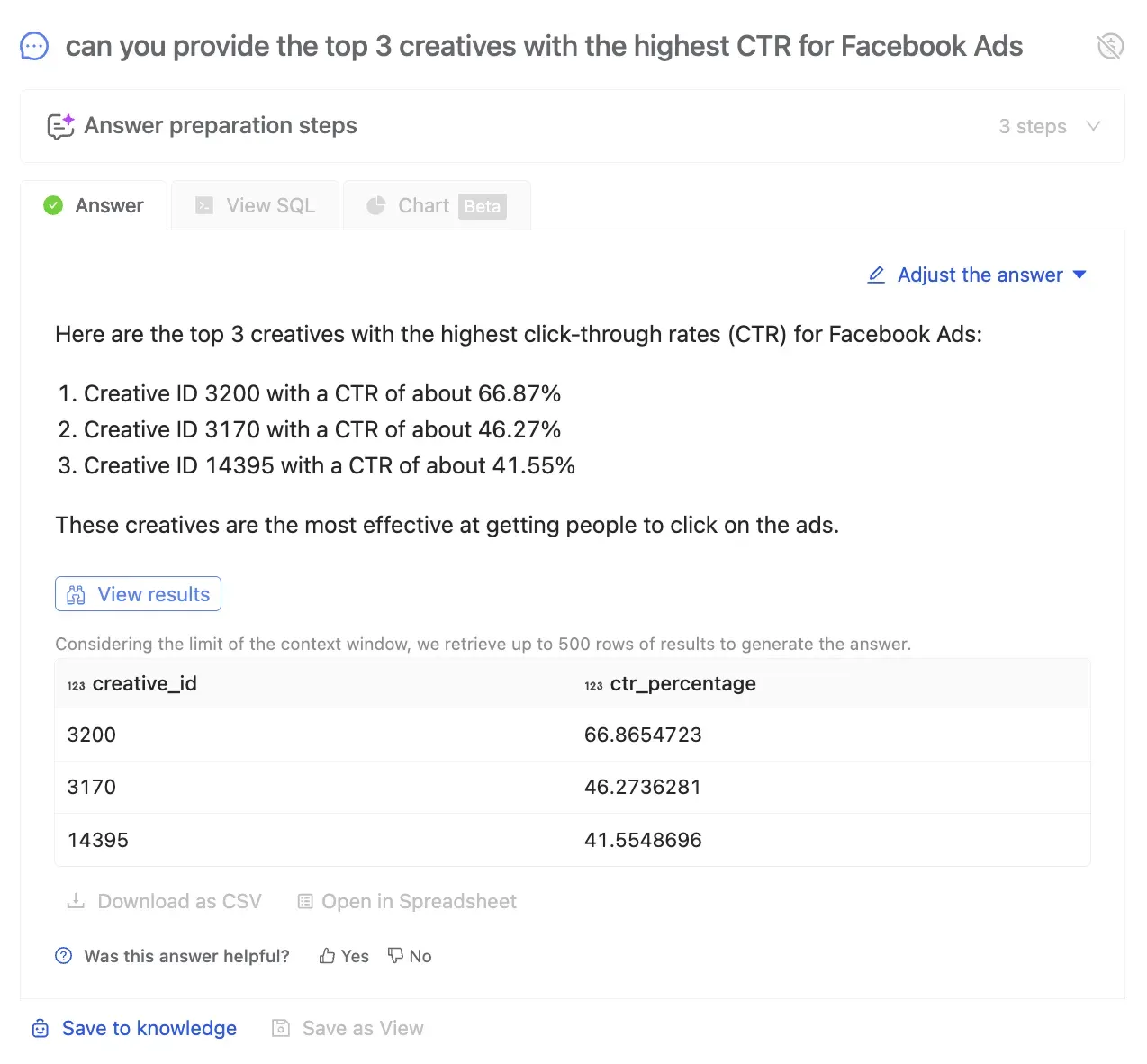
“Can you provide the top 3 creatives with the highest CTR for Facebook Ads?”
- CPC

Defining the CPC formula as a Knowledge instruction
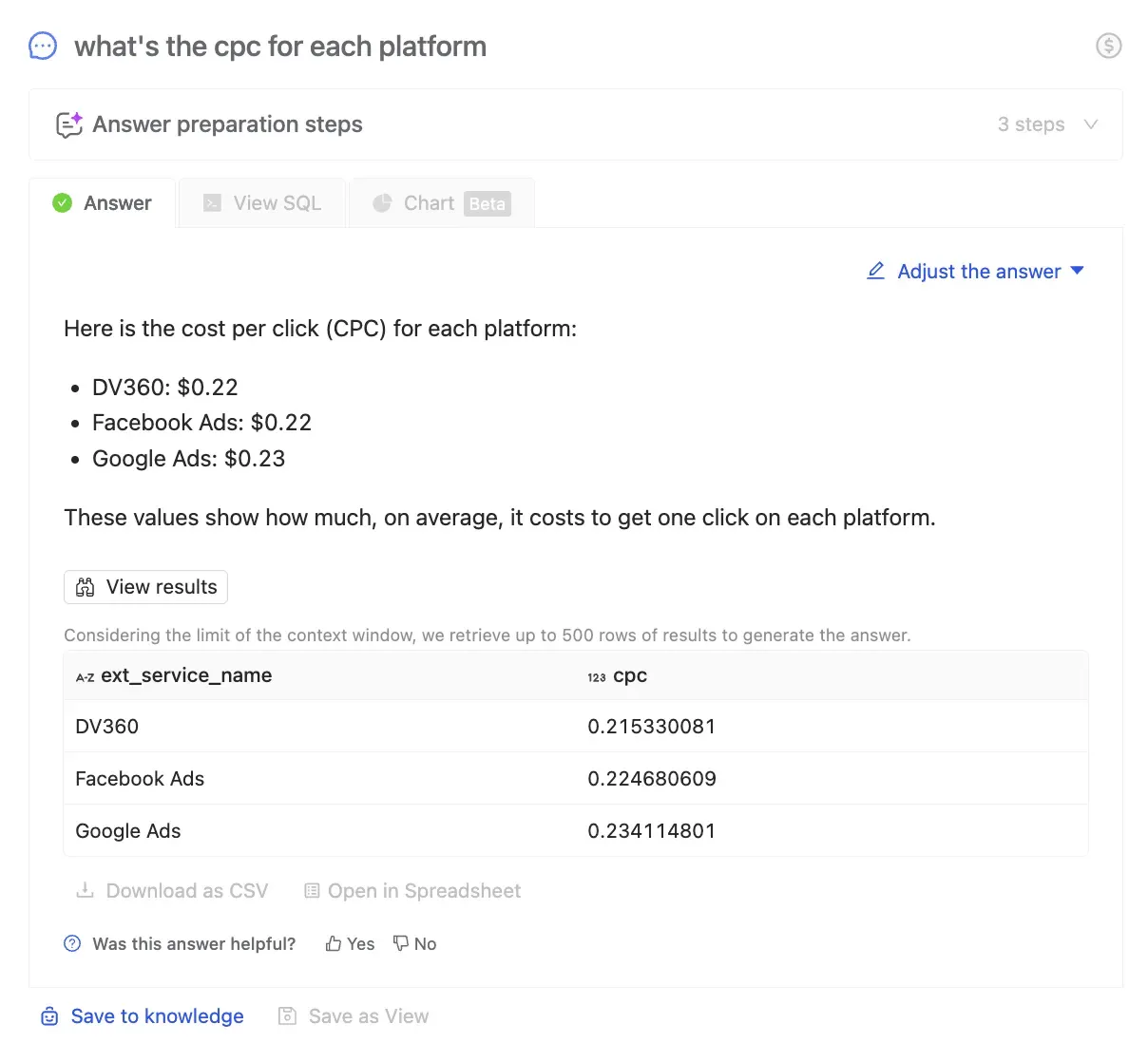
Sample questions you can ask:
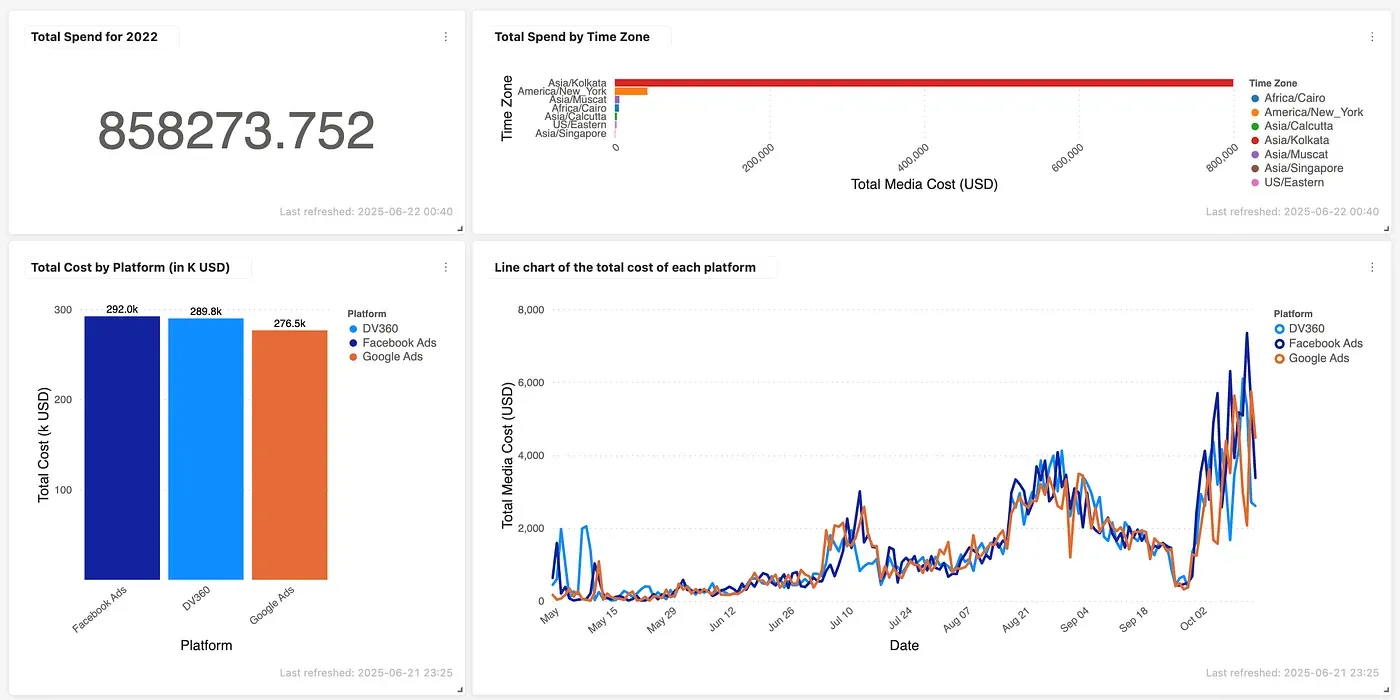
“What’s the CPC for each platform?”
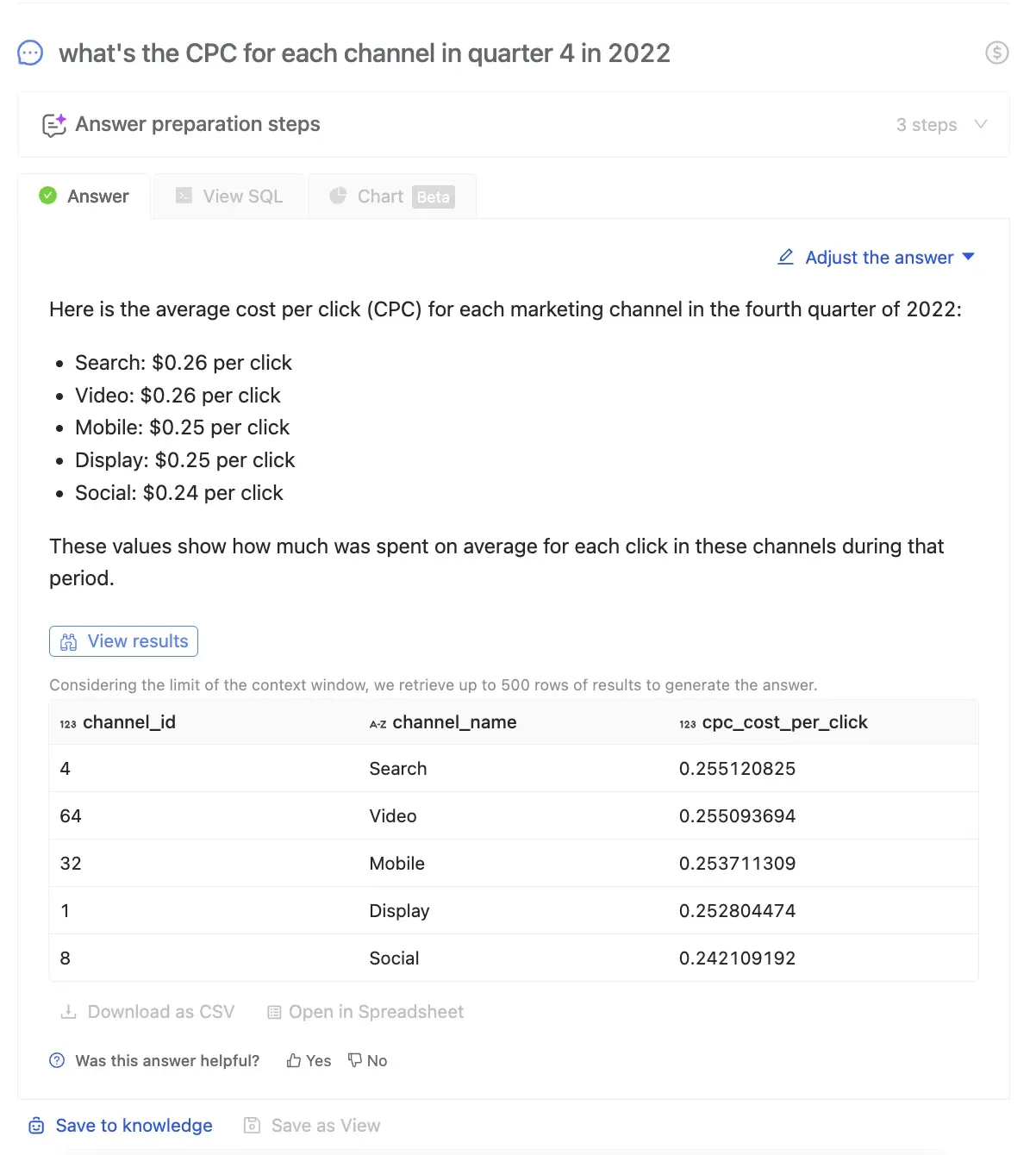
“What’s the CPC for each channel in quarter 4 in 2022?”
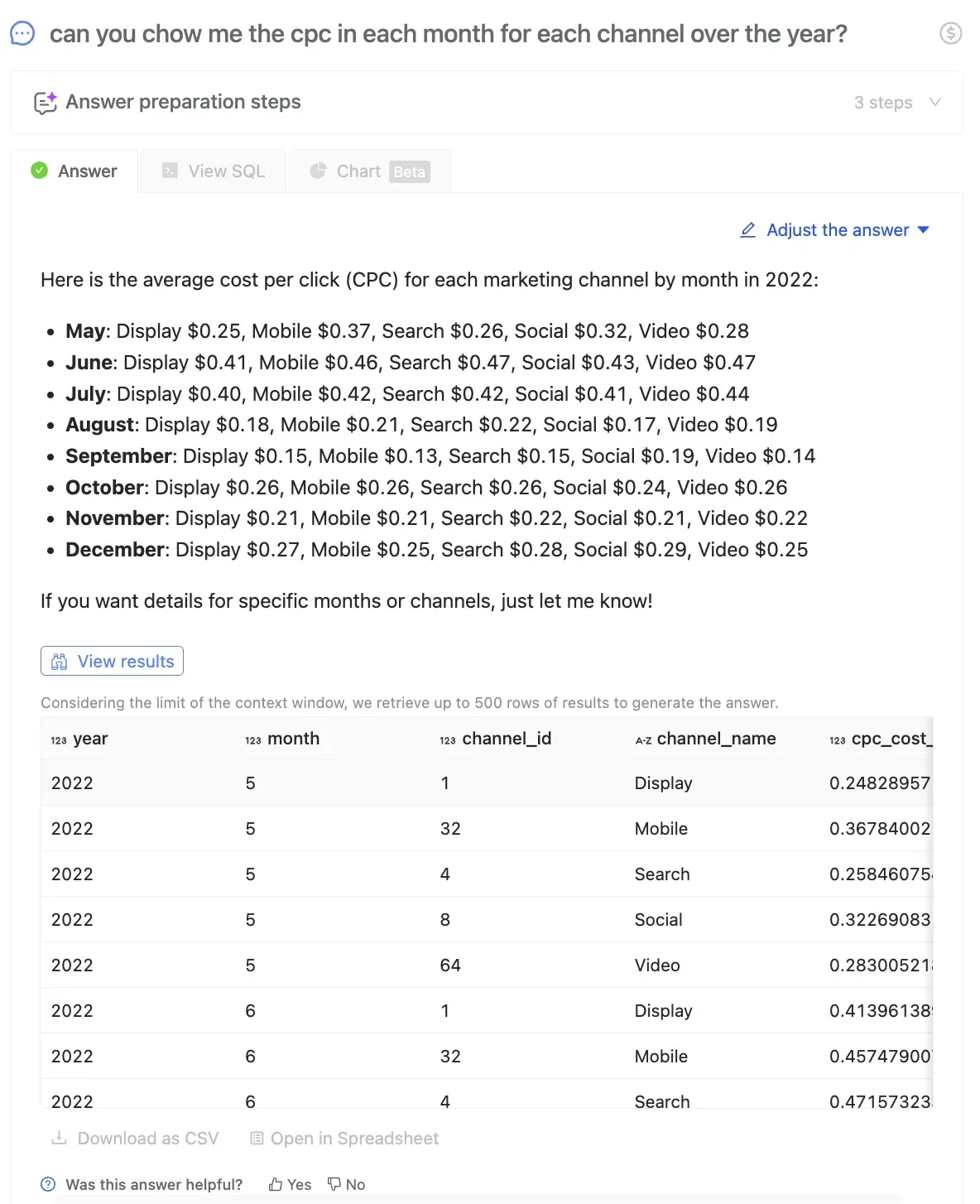
“Can you show me the cpc in each month for each channel over the year?”
Beyond Basic Metrics
Wren AI isn’t just for ad performance. Agencies can use it for:
- Client Management:
- “Please calculate the total revenue of contracts and the number of deals by lead source.”
- “Show me the list of clients who engaged with us via email in the past 3 months.”
- “List all campaigns from last month and sort them by total revenue generated.”
- Sales & Funnel Analysis
- “Give me the conversion rate from MQL to SQL by channel.”
- “How many deals are currently in the pipeline by stage?”
- “Show me the list of lost deals with MRR equal to or higher than 5000USD?”
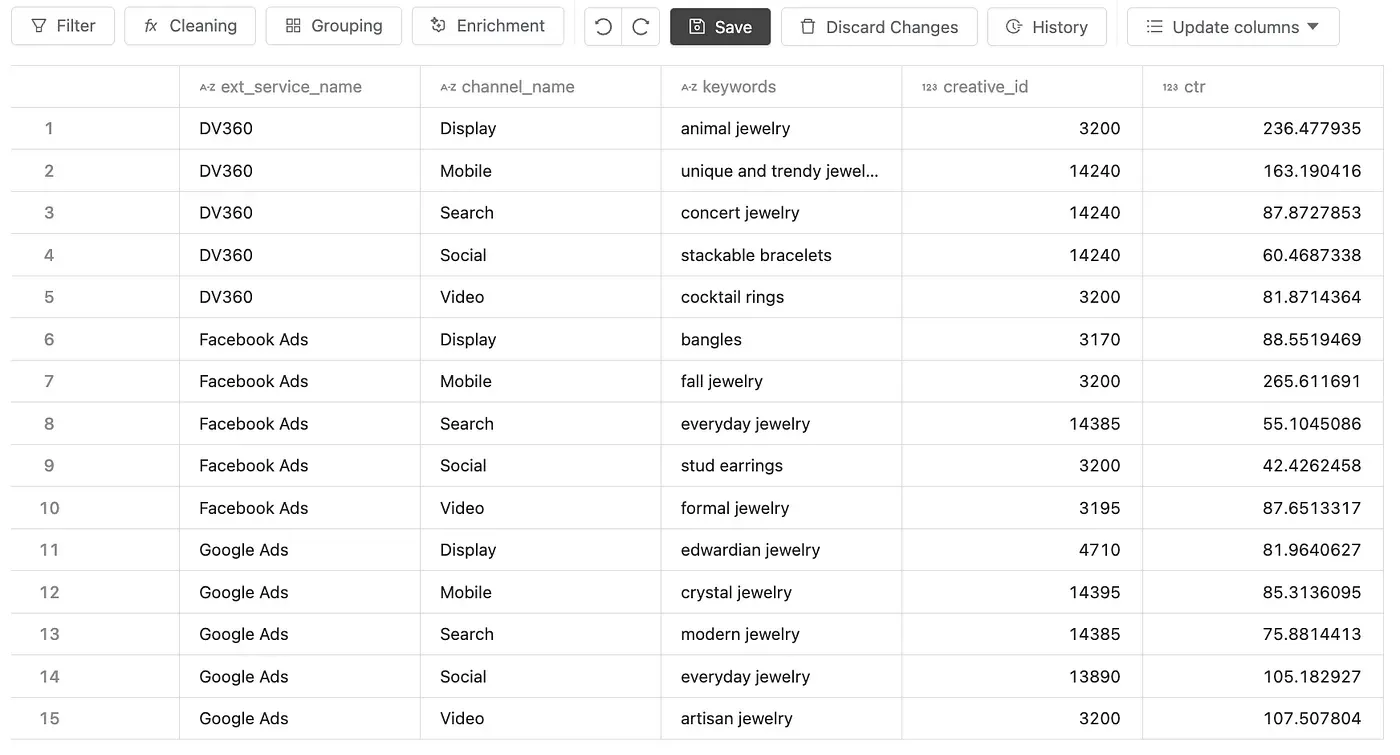
Drill Deeper with Spreadsheet View for Complex Queries
And when you’re working with more complex questions, or need to download and manipulate your results, you can open the output directly in Wren AI’s Spreadsheet view. This gives you the flexibility to sort, filter, and annotate your data just like you would in Excel, without writing a single line of SQL or waiting for someone to build a custom report.
Here are a few examples of questions:
“Can you show me the keyword that performs best on each platform and channel?”
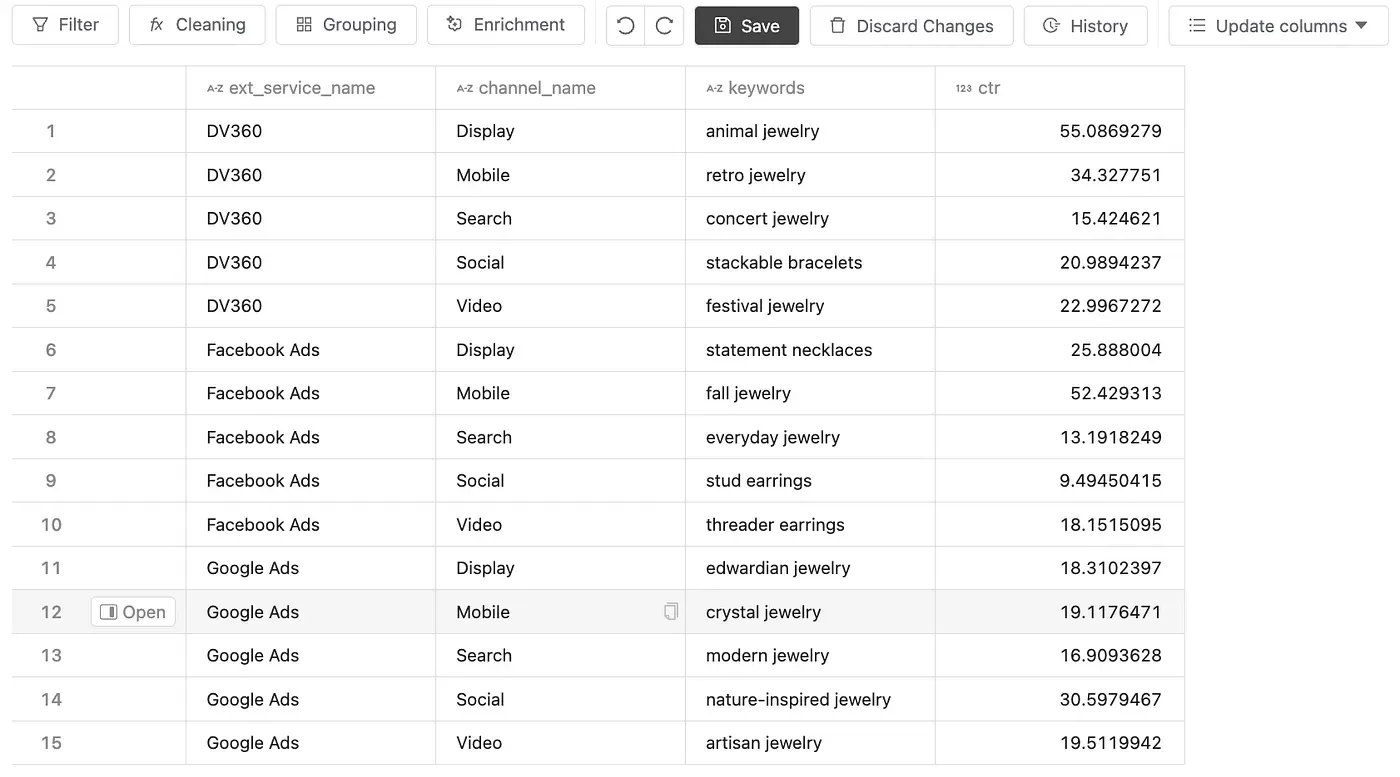
“Which keyword and creative combination has the best performance?”
Build the Story, Not Just the Chart
Why It Matters
Speed and clarity are critical in marketing. Wren AI gives you both. Unlike traditional BI tools that require technical expertise and lead time, Wren AI empowers your team to act immediately, without friction.
Whether you’re optimizing creative, tracking ad spend, or managing client accounts, Wren AI makes working with data feel as fast as having a conversation.
Wren AI helps turn your ad data into action, not tomorrow, not next week, but right now.
Ready to transform how your organization accesses data? Request a demo or start your free trial at getwren.ai
See governed GenBI in action
Watch short demos of Wren AI turning business questions into governed SQL, charts, and reusable GenBI apps.
Watch product demosRelated posts
Beyond Dashboards How Conversational AI is Revolutionizing Structured Finance Analytics
How Wren AI transforms complex financial data into instant, actionable insights through natural language, no technical expertise required
Aug 20, 2025Game On: How Wren AI Transforms Backend Gaming Data Into Actionable Insights
How Wren AI Turns Natural-Language Questions Into Cost-Efficient SQL to Accelerate Insights from Gaming Data
Sep 04, 2025Milliseconds to Millions Wren AI That Turns Ad Marketplace Chaos into Speed and Clarity
How Wren AI Transforms Ad Marketplaces with Real-Time Insights, Unified Metrics, and Natural Language Queries
The Wren Journal
Get the next deep dive in your inbox
Practical GenBI guides, product updates, and customer lessons from the Wren AI team. A couple of emails a month, no noise.

Keep reading
Insight, Trend
Beyond Dashboards How Conversational AI is Revolutionizing Structured Finance Analytics
How Wren AI transforms complex financial data into instant, actionable insights through natural language, no technical expertise required
Insight, Product, Trend
Game On: How Wren AI Transforms Backend Gaming Data Into Actionable Insights
How Wren AI Turns Natural-Language Questions Into Cost-Efficient SQL to Accelerate Insights from Gaming Data
Product
Milliseconds to Millions Wren AI That Turns Ad Marketplace Chaos into Speed and Clarity
How Wren AI Transforms Ad Marketplaces with Real-Time Insights, Unified Metrics, and Natural Language Queries