Product, News
Meet the New Wren AI: Same Trusted Answers, a Workspace You'll Love
We rebuilt every screen of Wren AI with one typeface, one color system, and one set of components. It's calmer, sharper, and faster to read. Your data, knowledge, and governance don't move an inch.
Wren AI Product Team
Updated: Nov 25, 2026
Published: Nov 25, 2026
Wren AI looks completely different today. Every screen, every control, every line of type has been redesigned. And the answers you trust haven't changed one bit.
Your team lives in Wren AI. You ask a question, read the answer, check the SQL, and ask the next one, dozens of times a week. A tool you spend that much time in should feel like a clear desk, not a crowded dashboard.
So we went back to first principles and rebuilt the whole interface around one idea: get out of the way of the answer.
The new look went live on Wren Cloud on November 16. Self-hosted deployments get it today, in the November 25 release.
There's nothing to learn and nothing to migrate. Your threads, knowledge, permissions, and connections are exactly where you left them. You'll just see them better.
Six things you'll notice right away
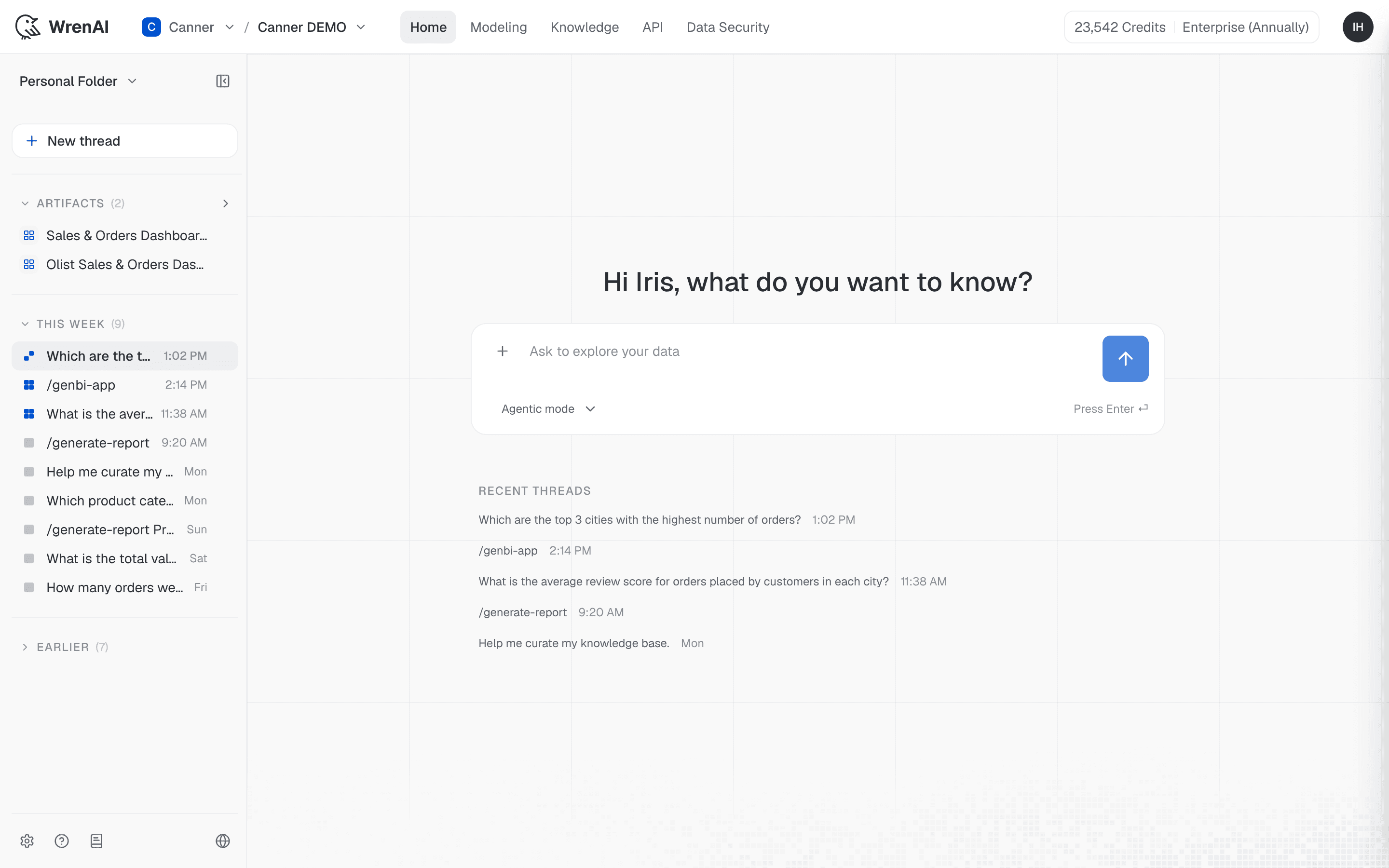
1. A home screen that just asks "what do you want to know?"
The new home screen does one job: it greets you and waits for your question. No clutter competing for your attention. Recent threads live in a clean sidebar, grouped into This week and Earlier, so picking up yesterday's analysis takes one click.
2. Type built for reading data
Wren AI now runs on a single typeface, Geist, with Geist Mono for SQL and code. Everything snaps to seven deliberate text sizes, so headings, answers, and table cells each have an obvious place in the hierarchy.
The result: long answers read like a well-edited report, and dense result tables scan in seconds instead of minutes.
3. Color that always means something
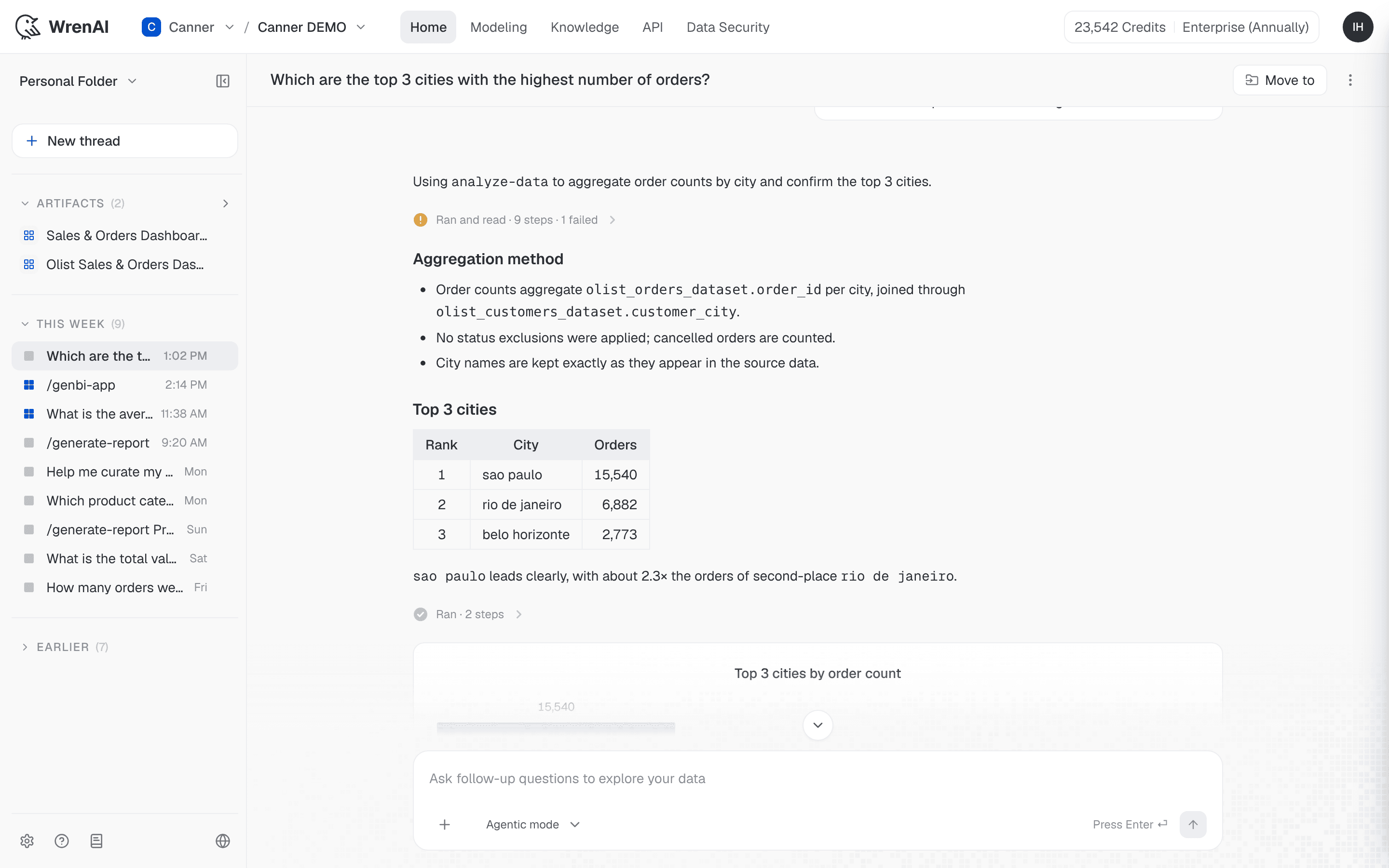
Every color now comes from one carefully tuned system, and every text color is contrast-checked, so words stay crisp on every surface.
Color also became a language you can rely on. Green is success. Gold is a warning. Red is an error. Everywhere, every time. You'll know what happened before you finish reading the message.
4. Everything lines up. Everything.
Buttons, inputs, menus, and cards now share the same corners, spacing, and heights. Put a dropdown next to a text field in a filter bar and they line up to the pixel.
You won't consciously notice it. You'll just feel that the product is calmer. Then you'll open an old screenshot and wonder how you lived with it.
5. Settings you can actually find
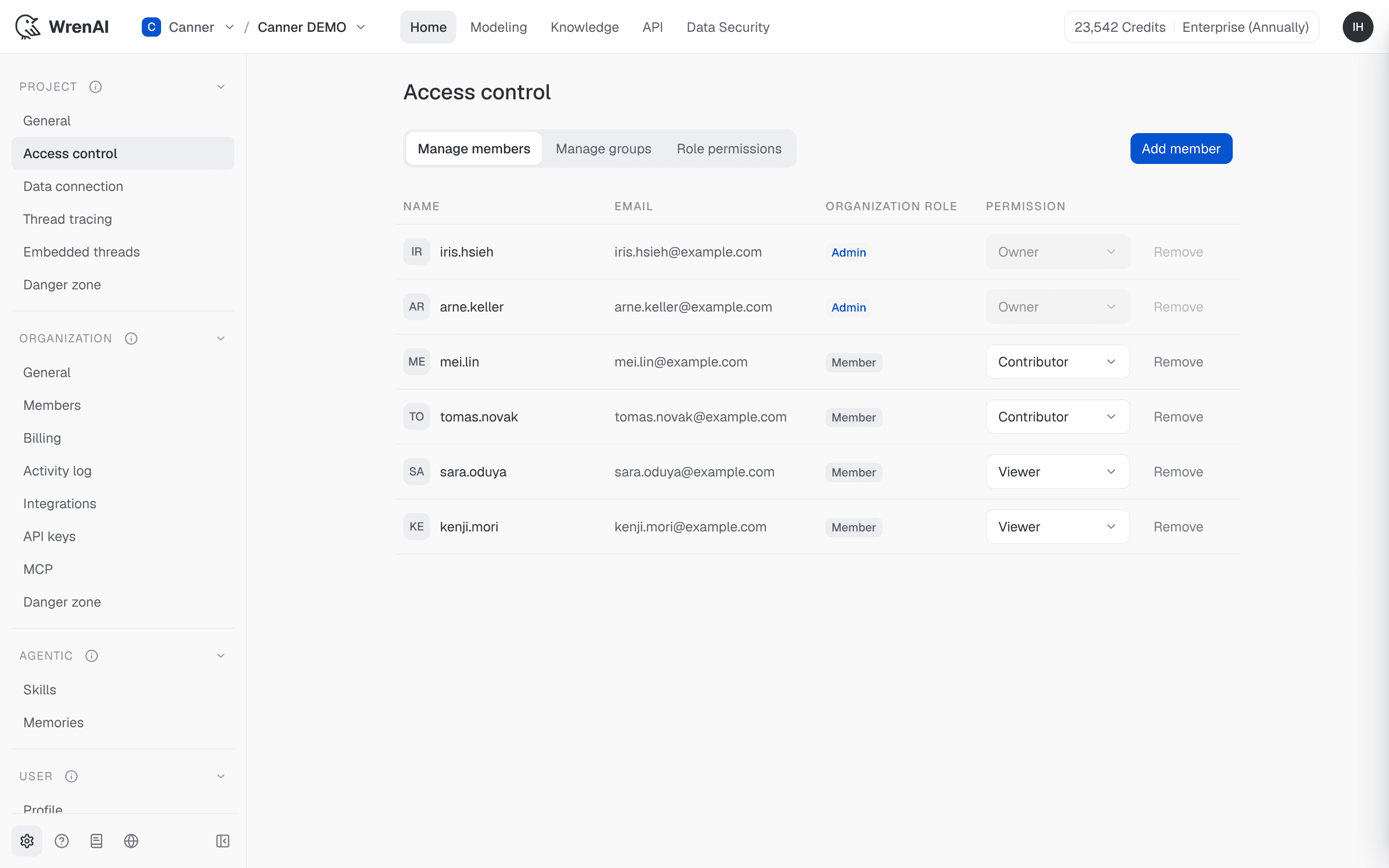
Settings are now organized into four clear groups: Project, Organization, Agentic, and User. Each one tells you up front what it controls, so you always know whether a change touches one project, your whole company, or just you.
Anything that can't be undone lives in its own Danger zone, with its own confirmation. No more irreversible buttons hiding next to harmless toggles.
6. Even the waiting is beautiful
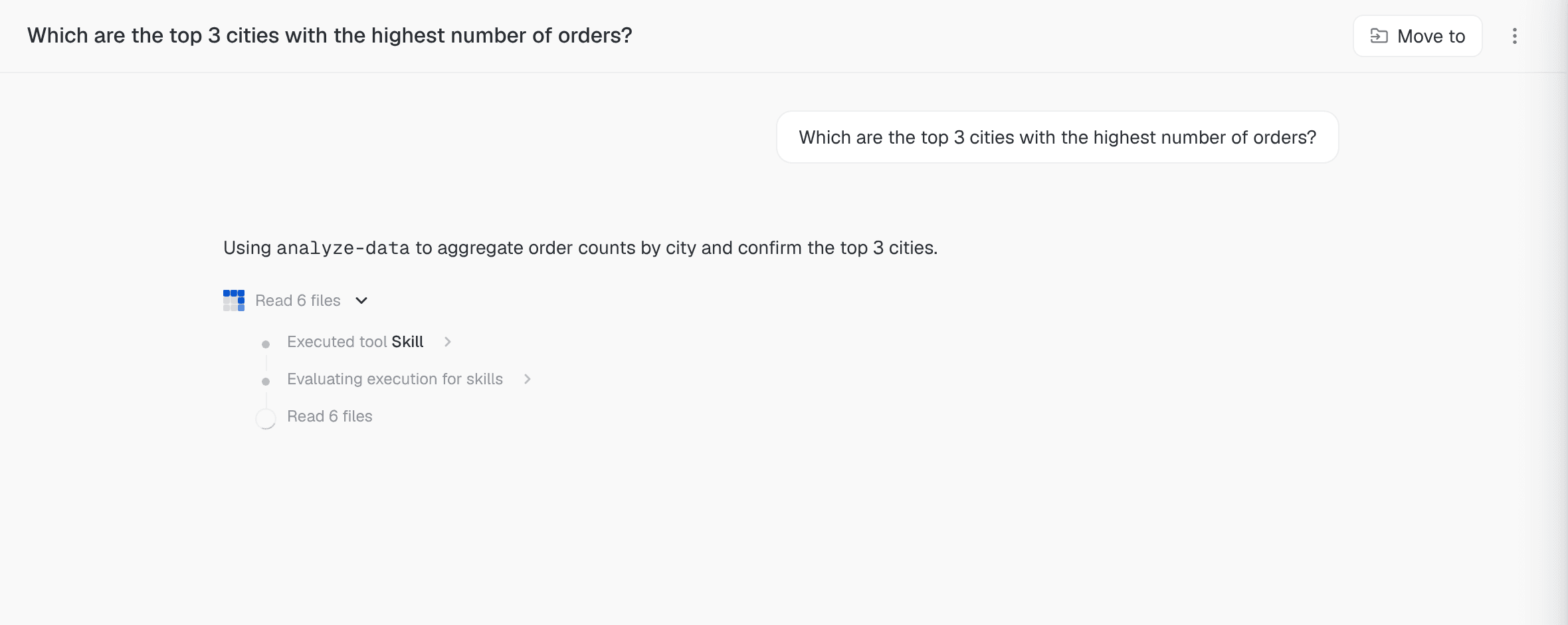
While Wren works, a quiet animated mark shows exactly which step it's on, with each completed step lining up neatly underneath. You can see the progress, without a wall of spinners.
And a few small delights
Icons respond with a subtle motion when you hover, so you always know what's clickable. Empty screens tell you what belongs there and how to get started, instead of leaving you staring at a blank page.
What didn't change: everything that matters
This is a new coat of paint, not a new engine. Under the surface, nothing moved:
- Governance. Row- and column-level access, validated SQL, and a full audit trail still apply before a single query runs.
- Your data and connections. No reconnecting, no re-syncing, no downtime.
- Your knowledge. Metrics, SQL pairs, and instructions keep shaping every answer, exactly as before.
- Wherever your team asks. Slack, Microsoft Teams, MCP, and embedded experiences keep working the way you set them up.
That holds wherever you run Wren: on Wren Cloud, or self-hosted inside your own network.
See it for yourself
On Wren Cloud? Just sign in. The new look has been waiting for you since November 16.
Running Wren self-hosted? It ships in today's November 25 release. Upgrade as usual. There's nothing extra to configure.
New to Wren AI? Try it free on your own data, or book a demo and we'll walk you through it.
The same answers you trust, in a workspace you'll actually look forward to opening.
See governed GenBI in action
Watch short demos of Wren AI turning business questions into governed SQL, charts, and reusable GenBI apps.
Watch product demosRelated posts
Wren AI Is Now Available in Microsoft Teams
Wren AI is now listed on Microsoft Marketplace. Ask a question in plain language inside a Teams chat or channel and get the answer in-thread, with the SQL and a chart, resolved against the same context layer every other surface uses.
Sep 28, 2026How Wren AI Enforces Role-Based Access Control on AI-Generated SQL
Wren AI doesn't replace your data security policy, it enforces it. Row-level and column-level security are applied in Wren Engine at query time, driven by who is asking, even when the SQL was written by an AI.
Nov 05, 2026One Engine, Three Embedded Assistants: How Every Answer Stays Scoped
A shopper, a GP, and a claims agent ask three very different questions inside three different products. All three answers come from one Wren AI engine, and none of them can reach data that belongs to someone else. Here is what happens inside each session.
The Wren Journal
Get the next deep dive in your inbox
Practical GenBI guides, product updates, and customer lessons from the Wren AI team. A couple of emails a month, no noise.

Keep reading
Product, News
Wren AI Is Now Available in Microsoft Teams
Wren AI is now listed on Microsoft Marketplace. Ask a question in plain language inside a Teams chat or channel and get the answer in-thread, with the SQL and a chart, resolved against the same context layer every other surface uses.
Product, Tutorial
How Wren AI Enforces Role-Based Access Control on AI-Generated SQL
Wren AI doesn't replace your data security policy, it enforces it. Row-level and column-level security are applied in Wren Engine at query time, driven by who is asking, even when the SQL was written by an AI.
Product, Insight
One Engine, Three Embedded Assistants: How Every Answer Stays Scoped
A shopper, a GP, and a claims agent ask three very different questions inside three different products. All three answers come from one Wren AI engine, and none of them can reach data that belongs to someone else. Here is what happens inside each session.